How to use AI to design a modern kitchen island layout?

Vatsal Sanghvi
Feb 11, 2026
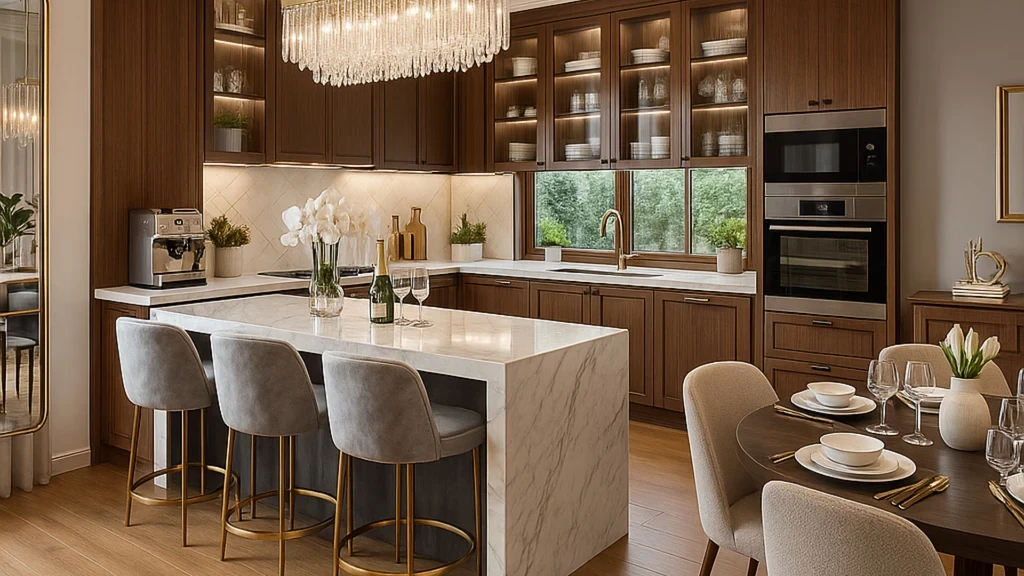
The kitchen island is one of those decisions that looks simple on paper and turns complicated fast. The size, shape, placement, countertop material, seating arrangement, and whether to include storage or appliances all affect each other. Change one thing and something else stops working. That's exactly the kind of problem where AI earns its place in the planning process.
This guide walks through how to use AI to design a modern kitchen island layout, what inputs actually produce useful results, where the technology works well, and where you still need to apply your own judgment.
Why Island Layout Planning Benefits from AI Visualization
Most kitchen planning mistakes happen because it's hard to picture proportions in an empty room. You might measure out a 4x2 foot island on the floor with tape, decide it looks fine, and then find that once it's installed, the clearance to the cabinets feels tight or the seating doesn't flow right.
AI visualization tools work around this by turning a photo of your actual kitchen into a rendered version with the island already placed. You're not looking at a floor plan or a generic showroom image. You're looking at your kitchen, with your lighting and your walls, with a new layout applied. That difference matters when you're trying to make a confident decision.
What Modern Kitchen Island Design Actually Involves
Before jumping into the tool, it helps to understand what variables you're working with. A modern island layout typically involves decisions across several dimensions: the island's footprint and shape, the countertop material and overhang for seating, whether the island is freestanding or built-in, the presence of a prep sink or cooktop, pendant lighting above it, and how the island anchors the wider kitchen zone.
Modern design in particular leans toward clean lines, minimal hardware, flat-panel cabinetry, and materials like quartz, concrete, or waterfall marble. The island is often the statement piece that pulls the style together, which means getting it right visually matters as much as getting the dimensions right functionally.
How Home Design App Approaches Kitchen Island Visualization
Home Design App works from a photo of your existing kitchen. You upload an image, select "kitchen" as the room type, choose a design style, and the AI generates a redesigned version of the space. The app supports over 25 distinct styles, including Modern, Minimalist, Scandinavian, Contemporary, and Industrial, all of which have different takes on what a kitchen island should look like.
What the app does well is apply a coherent design language across the entire kitchen in a single generation. When you choose a Modern style, the island, the cabinetry, the backsplash, and the lighting all shift together in a way that's consistent. That's more useful than trying to mentally piece together separate references from different sources.
The ai kitchen design feature also supports object editing after generation, so you can add, remove, or replace elements in the output. If the AI placed the island in a position that doesn't match your actual space, or added a feature you don't want, you can refine from there rather than starting over.
What You Need to Provide for Accurate Results
The quality of what you get out is closely tied to the quality of what you put in. A few things that genuinely improve results:
A well-lit, clear photo taken from the corner or doorway of the kitchen gives the AI the most complete view of the space. Overhead lighting or a photo taken in the middle of the day with natural light tends to produce cleaner outputs than dark or backlit shots.
The photo should show the full floor area if possible. Kitchen island placement depends heavily on how much floor space exists between the perimeter cabinets, and a photo that captures that context gives the AI more to work with.
Choosing a style that aligns with the existing bones of your kitchen also helps. If your kitchen has traditional crown molding and raised-panel doors, selecting a Modern style will produce an interesting visualization, but the result will read more as a hypothetical than a practical guide. If you want to see what a modern island would look like in your current kitchen without changing everything else, you may need to run a few variations and treat them as directional rather than exact.
A Step-by-Step Workflow for Designing Your Island Layout
Start by photographing your kitchen from its widest angle. Include the floor, ceiling, and as much wall cabinetry as possible in the frame. Upload the photo to Home Design App and select "kitchen" as your room type.
Choose your design style. For modern island layouts, the Modern, Minimalist, and Contemporary styles in the app tend to produce results with the most relevant island designs: flat surfaces, integrated storage, clean edges, and minimal ornamentation. If you want warmth added to modern lines, the Scandinavian style introduces wood tones while keeping the overall geometry clean.
Generate your first version and study what the AI produced. Pay attention to the island's proportions relative to the room, the countertop style, the seating overhang, and how pendant lighting is positioned. These are all meaningful design decisions the AI is making based on the style you selected and the room dimensions it can read from the photo.
From there, use the editing tools to adjust what isn't working. If the island needs to be larger, or you want to see a waterfall edge rather than a standard overhang, or you want to add bar stools at a different position, the object editing feature lets you modify the output directly.
Run two or three style variations before settling on a direction. The difference between how a Modern and a Contemporary island reads in your specific kitchen is useful information that's hard to get any other way.
What AI Visualization Can and Cannot Do for Island Planning
AI is good at helping you make visual decisions. It shows you how an island style fits the overall kitchen, which materials feel coherent with the rest of the space, and which proportions look right in your specific room. That's genuinely useful at the early and mid stages of planning.
What it cannot do is measure. The app works from photos, not from architectural drawings with dimensions. The island it generates may look right visually but not represent a physically achievable size for your floor plan. Always confirm clearances manually: 42 to 48 inches of clearance on the working sides of an island is the standard recommendation for comfortable movement, and that number needs to be verified in the physical space regardless of what looks good on screen.
AI also does not account for plumbing or electrical routing. If you want a prep sink or a cooktop on the island, those decisions have significant structural and cost implications that go beyond what any visualization tool can address.
Use the AI outputs as a direction-setting tool and a communication aid, not as a finished specification.
Using the Results to Move Forward
One of the more practical uses of AI-generated kitchen island designs is showing them to contractors, kitchen designers, or cabinet suppliers. A realistic rendered image of your kitchen with an island is much clearer than a verbal description, and it sets expectations accurately. If you're working with a designer, the generated images help you articulate what you want before the paid design work begins.
If you're exploring a full kitchen renovation rather than just the island, it's worth seeing what a complete overhaul looks like as well. Running your kitchen photo through the broader ai interior design workflow can show you how the island fits within a fully reimagined space, which is useful if the kitchen is part of an open-plan living area.
Common Misconceptions About AI Kitchen Design Tools
A common expectation is that you describe what you want in text and the AI builds it. Home Design App is photo-based rather than text-prompt-based. You provide a real photo of your kitchen, and the AI transforms it according to the style you select. This approach produces more grounded, realistic results because the AI is working from your actual space rather than generating a generic kitchen from scratch.
Another misconception is that one generation is the final answer. The value in tools like this comes from iteration. Run multiple styles, compare them side by side, refine specific elements, and use the outputs to inform a real decision rather than treating the first result as definitive.
People also sometimes expect precise measurements to come out of a photo-based tool. They don't. The rendered output is a visual guide, not a technical drawing. Treat it accordingly.
Getting the Most Out of Each Generation
A few practical habits that tend to produce better outputs: photograph the kitchen when it's clean and clear of temporary items like dishes or grocery bags, since these can interfere with how the AI reads the space. Use portrait or wide-angle framing rather than close-up shots. If you're running multiple style tests, use the same base photo for all of them so the comparisons are fair.
When the AI generates an island that's close but not quite right, use the editing tools before generating again. It's more efficient to refine an output than to generate from scratch hoping for a different result.
Frequently Asked Questions
Can AI design a kitchen island layout from scratch, or does it need an existing kitchen photo?
Home Design App works from a photo of your real kitchen. It doesn't generate a layout from dimensions or a floor plan. You upload a photo, choose a style, and the AI transforms the existing space. If you want to design an island for a kitchen that doesn't exist yet, you can use a photo of an empty room or a similar reference space as a starting point.
How accurate are AI kitchen island visualizations compared to what you'd actually build?
The visual proportions are generally close, but AI-generated designs are not dimensionally precise. The island in a rendered image might look right but not reflect the exact clearances available in your actual kitchen. Always verify measurements independently before making purchasing or construction decisions.
What design styles work best for a modern kitchen island layout?
In Home Design App, the Modern, Minimalist, and Contemporary styles are the most aligned with what most people mean by modern kitchen island design: clean lines, flat-panel cabinetry, minimal hardware, and quality countertop materials. The Scandinavian style adds warmth through wood tones while staying within a clean, modern framework.
Can I see how a waterfall island edge would look in my kitchen using AI?
Yes. After generating an initial design, you can use the object editing tools in Home Design App to adjust or replace elements in the output, including countertop styles. Running the Contemporary or Minimalist styles tends to produce waterfall edge results more frequently as a default.
Does AI account for plumbing or electrical when designing a kitchen island?
No. AI visualization tools show you what an island looks like, not whether it's structurally or mechanically feasible. If you want a sink or cooktop integrated into the island, those decisions require consultation with a licensed plumber and electrician, which is separate from the design visualization step.
How many design variations should I generate before choosing an island style?
Most people get meaningful value from three to five variations. Try at least two or three different styles using the same base photo, compare them side by side, and note which elements in each feel closest to what you want. From there, use the editing tools to refine the best candidate rather than continuing to generate from scratch.
Can AI kitchen design tools help me communicate my vision to a contractor or designer?
Yes, and this is one of the more practical uses. A realistic rendered image of your kitchen with the island you want is far easier to share and discuss than a verbal description. Most contractors and designers find it useful to see a directional visual before the detailed planning work begins.
Is a modern kitchen island layout suitable for a small kitchen?
Modern design principles, with their emphasis on clean lines and efficient use of space, can work well in smaller kitchens. A smaller island or a peninsula configuration often reads as cleaner in a compact space than a large freestanding island would. Using Home Design App to test different island sizes and placements in your actual kitchen is a practical way to find the right scale before committing.
What photo quality does Home Design App need for good kitchen island results?
The app supports JPEG, PNG, and HEIC files up to 15MB. For kitchen island design specifically, a well-lit wide-angle photo taken from a corner or doorway gives the AI the most complete view of the space, which typically produces the most useful output. Dark, blurry, or heavily cropped photos tend to produce less accurate results.
Can I use AI-generated kitchen island designs for commercial renovation projects?
Yes. All images generated under Home Design App's paid plan include a commercial usage license, making the outputs usable for professional projects, client presentations, and real estate purposes.